Authentication
Upon completion of the pairing process, the caller receives a set of pair tokens, to be used as authorization for all iTero APIs.
iTero authentication API complies with Auth0 Authorization Code Grant.
Definitions, Acronyms, Abbreviations
| Term | Description |
|---|---|
| Myitero.com | iTero portal to manage account and cases |
| Production environment | Live environment |
| Redirect URL | URL to which the authorization response should be returned |
| Callback URL | URL to send webhook notifications to |
Required Information
The following information will be provided by iTero Connectivity personnel after the project has been approved:
- The application ID that is assigned to your app
<ClientID> - The application secret assigned to your app
<ClientSecret> - MyiTero.com test credentials
- Server URL for authorization process – shown as {{oauthBase}}
- Server URL for pairing process – shown as {{baseUrl}}
- Align Login Page for user authentication – shown as {{loginPage}}
- A default redirect URL used for internal development
Redirect URL
iTero's authorization server will redirect users back to this URL after a successful login. Multiple Redirect URL's are allowed to be whitelisted.
A Redirect URL must satisfy the following constraints:
- Whitelisting required – The URL must be whitelisted on the iTero side.
- HTTPS only – The URL should use the HTTPS protocol.
- No hash (
#) – iTero does not support URLs containing#. - Wildcard support – The URL may include a wildcard (
*) to match multiple subdomains or paths.
Example:https://*.example.com/iTeroLoginmatches both:https://api.example.com/iTeroLoginhttps://web.example.com/iTeroLogin
Authentication & Pairing Overview
The Authentication and Pairing process consists of four steps:
- User Authentication - returns an access and refresh token for a given user
- Discovery - returns regional URL's to use for the current user
- Get Available Companies for Pairing - returns the current accounts available for pairing to the current user
- Pair to a chosen account - returns an account-based pair access token and pair refresh token. To be used for calls to the iTero API.
iTero token types and expiry
iTero has two token types for authorization:
1) User access / refresh token:
Obtained after the authorization code exchange. Represents an individual user.
It's used exclusively for the first call to Discovery and to pair to the desired account(s) as soon as possible to obtain the corresponding Pair tokens.
The user refresh token expires after 18 hours, preventing attempts to obtain a new user access token. Storing the user refresh token is discouraged.
2) Pair access / refresh token:
Represents an account in iTero. All users of an account share the same pair token.
Used for all iTero API Calls after the pairing process is complete. Also used for Discovery.
- The pair refresh token is valid for three months and uses a sliding window mechanism.
- Each time a call is made to refresh the pair token, its expiration is reset to three months from the time of the request.
- If there is no API activity for three months, the pair refresh token will expire and the full login flow will have to be repeated for the affected account(s).
- If the API is used continuously, the pair refresh token will remain valid and will not expire.
iTero token storage
The authentication process can work for a server to server configuration or server to client configuration. For a server to server configuration, the token can be securely stored by the 3rd party in a server and be used by the users, since the pair token represents an account and not an individual. In case a server is not available to the account, both sets of tokens can be managed on the client side. However this option is less preferable.
Please refer to the chart at the end of this document for a graphical view of the process.
Authentication Process
Authorization code grant request
The 3rd party software should call the authorization page URL, based on the following:
- {{oauthBase}}
- ClientID
- State
- Redirect URL
- {{loginPage}}
- Scope - openid
- Prompt - login
{{oauthBase}}/oauth2/authorize?client_id=<Client_ID>&response_type=code&state=<State>&redirect_uri=<Redirect URL>&loginPage=itero_app_login.jsp&scope=openid&prompt=login
A Login page will be displayed where users have to enter their MyiTero.com credentials.
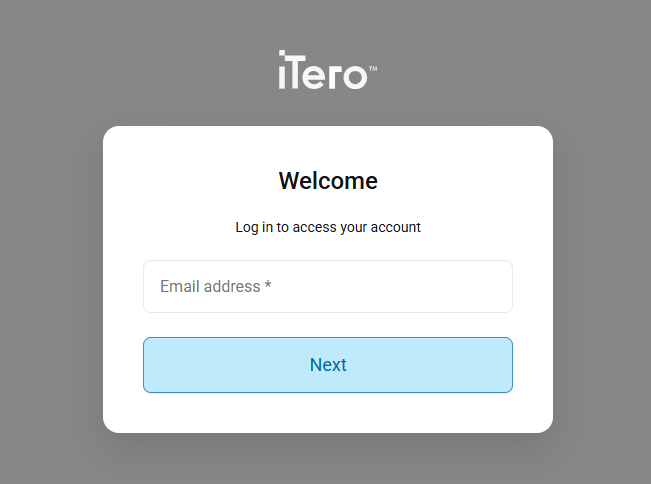
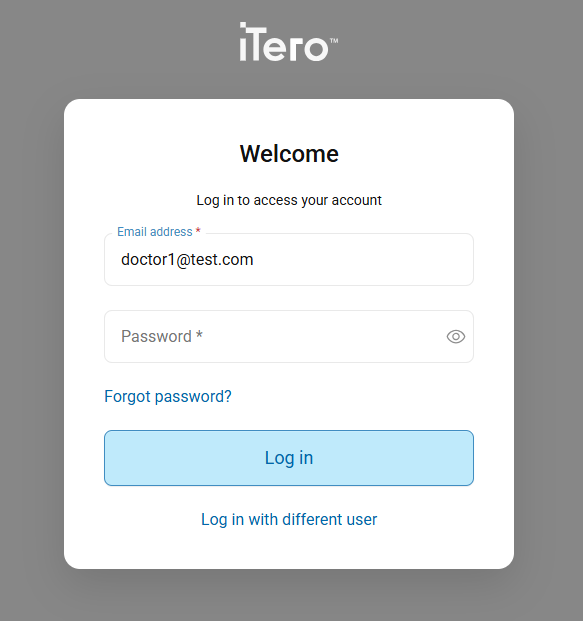
Figure 1: Enter your iTero credentials
The user will be redirected to the address specified in the Redirect_URL, alongside the 'code' and 'state' parameter needed for the next step.
URL format:
<RedirectURL>?state=<string>&code=<AuthorizationCode>&sms_uri=<string>
State Parameter
For extra security, a 3rd party partner can use the state parameter with a random value that is sent with the authorization request and can compare it to the returned state parameter. Code values should be identical.
Exchange the authorization code for an access token
Provide the authorization code that was returned in the previous step.
| Endpoint information | |
|---|---|
| HTTP Method | POST |
| Path | {{oauthBase}}/oauth2/token |
Headers
‘Content-Type’: ‘application/x-www-form-urlencoded'
Request body
code=<AuthorizationCode>
grant_type=authorization_code
client_id=<ClientID>
client_secret=<ClientSecret>
redirect_uri=<Redirect URL>
Note
- Auth code should be used immediately. It will expire within a few minutes.
- The returned Auth code is single-use only.
Response
The call returns an access token with 1-hour expiry, and a refresh token that expires in 18 hours.
It is not recommended to store the user refresh token.
Response codes are:
| HTTP Status Code | Description | Scenario | Recommendation |
|---|---|---|---|
| 200 | OK | / | / |
| 400 | Bad request | 1. Wrong code 2. Missing code |
Double check if call used the correct authorization code |
| 401 | Unauthorized error | The client is not authorized to perform this operation | Check if call is using the correct credentials |
| 500 | Internal Server error | / | A retry mechanism is recommended for this error message |
| 504 | Gateway Timeout | Timed out | Retry the request after a brief wait time (1000ms) |
In case of returned code of 200, the following response will be returned:
{
    "access_token": access token,
    "token_type": "Bearer",
    "refresh_token": refresh token,
    "id_token": token ID,
    "expires_in": 3600,
    "scope": "openid profile email offline_access"
}
Below is a table describing the information that has been returned in the response:
| Field | Type | Description |
|---|---|---|
| access_token | String | Access token to be used in APIs as a bearer token. Its size is up to 8K. |
| refresh_token | String | Refresh token to be used when access token is expired. Size is up to 40 characters. |
| scope | String | openid profile email offline_access |
| id_token | String | Cached user profile |
| token_type | String | Bearer |
| expires_in | Number | Number of seconds left before token’s expiration. Initial value is 3600 (one hour) |
Refresh Token Request
When an access token expires, use the account's refresh token to obtain a new access token.
This step does not require interaction with the user.
Calls to Refresh Token endpoint should be limited to one call per hour per account, to prevent any refresh token invalidations.
| Endpoint information | |
|---|---|
| HTTP Method | POST |
| Path | {{oauthBase}}/oauth2/token |
Headers
'Content-Type’: ‘application/x-www-form-urlencoded'
Request body
refresh_token={{refresh_token}}
grant_type=refresh_token
client_id=<ClientID>
client_secret=<ClientSecret>
Response
Response codes are:
| HTTP Status Code | Description | Scenario | Recommendation |
|---|---|---|---|
| 200 | OK | / | / |
| 401 | Unauthorized error | 1. Wrong refresh token 2. Missing refresh token |
Double check that call is using the correct refresh token |
| 500 | Internal Server error | / | A retry mechanism is recommended for this error message |
| 504 | Gateway Timeout | Timed out | Retry the request after a brief wait time (1000ms) |
In case of returned code of 200, the following response will be returned
{
    "access_token": string,
    "token_type": string,
    "refresh_token": string,
    "id_token": string,
    "expires_in": number,
    "scope": ""
}
Revoke token request
Token revocation will deprecate the refresh token passed in the call.
To resume API access for an account, the entire login flow has to be repeated from the beginning.
Reasons to revoke a token include:
- The current token is no longer required
- The current token was compromised
- It is decided by design to proactively generate a new refresh token
| Endpoint information | |
|---|---|
| HTTP Method | POST |
| Path | {{oauthBase}}/oauth2/revoke |
Headers
'Content-Type’: ‘application/x-www-form-urlencoded''
Request body
token={{refresh_token}}
token_type_hint=refresh_token
client_id=<ClientID>
client_secret=<ClientSecret>
Response
| HTTP Status | Code | Description | Scenario | Recommendation |
|---|---|---|---|---|
| 200 | OK / Failure | Due to Auth0 security behavior, a 200 OK response may be returned regardless of whether the refresh token is valid or has already been revoked. | / | Perform a token refresh request and verify the response to confirm whether the token is still valid or has been invalidated. |
| 400 | Bad Request | / | / | Ensure the body of the call has the correct fields. Inspect the error message. |
| 500 | Internal Server error | / | A retry mechanism is recommended for this error message | / |
| 504 | Gateway Timeout | Timed out | Retry the request after a brief wait time (1000ms) |
Discovery
Each iTero account is permanently associated with a specific region. Callers must use regional base URLs in order to reliably access iTero services. The Discovery endpoint provides these URLs dynamically, ensuring requests are routed to the correct regional environment for a given user or account. The regional URLs must be used for all future API calls of a particular user or account. Discovery usage is mandatory for the iTero API Implementation.
Note
iTero operates in four regions:
- North America
- Europe
- Asia Pacific
- China
Benefits
-
Accurate regional endpoint resolution
The Discovery response returns the exact base URL for the region where the user or account is hosted. -
Does not rely on DNS geo-based routing
DNS-based geo routing does not always resolve to the correct region. By using the regional base URL provided by Discovery, calls are guaranteed to reach the correct region, regardless of DNS behavior or ISP routing inconsistencies. -
Consistent behavior regardless of user location
Requests are routed to the correct region regardless of the user's current location. Travel, VPN usage, or other scenarios where geographic location may change do not affect the API results.
When to use
The Discovery endpoint should be invoked in the following scenarios:
-
After initial authentication and before pairing
The initial call to the Discovery endpoint must use the first token returned by the Authorization Code endpoint. This ensures that the correct regional URL is selected based on the user's iTero account.
-
Periodically for every account
It is recommended to call the Discovery endpoint at least once per day per account with the pair access token. This practice helps accommodate any future platform updates from iTero side that may result in changes to the URL's.
Which endpoints do not use Discovery?
Authorization endpoints:
- Authorize
- Authorization Code
- Refresh Token
- Revoke Token
Discovery Versions
iTero currently provides two versions of the API
- V2 is a complete, Standalone API suite
- V3 is a new installment of the iTero API that provides enhanced functionality and accommodates enhanced use cases
Each API version uses different contracts. In order to call a specific API version, the specific Discovery version must also be called.
- To call a V2 endpoint, URL's from Discovery V2 are required.
- To call a V3 endpoint, URL's from Discovery V3 are required.
Discovery mismatch
Calls to the API will fail if the Discovery version does not match the Endpoint version.
For example, if a V3 endpoint is called using values returned from V2 Discovery, the request will not succeed. The same behavior applies vice versa.
| Endpoint information | |
|---|---|
| HTTP Method | GET |
| First call: | {{baseUrl}}/api/third-party/v2/api-discovery-by-name-and-version?discoveryName=third-party&version={{discoveryVersion}} |
| Subsequent calls: | {{Domain}}/{{Path}}/api-discovery-by-name-and-version?discoveryName=third-party&version={{discoveryVersion}} |
Header
Authorization: The access token received after the initial authentication step is provided as a Bearer Token authorization type.
Subsequent calls after pairing should be made with the pair access token of the specific account.
Parameters
Call parameters must include the following mandatory fields and values, depending on the use case:
| Parameter | Value |
|---|---|
| discoveryName | third-party |
| Parameter | Available values |
|---|---|
| version | 2 |
| version | 3 |
Response
| HTTP Status | Code | Description | Scenario | Recommendation |
|---|---|---|---|---|
| 200 | - | OK | Empty Array | If the parameter values are incorrect, an empty response is returned. |
| 200 | OK | One entry in array | Correct behavior | / |
| 400 | Bad request | Wrong asset format | Double check the parameter fields and values | / |
| 401 | Unauthorized error | 1. Wrong token 2. Missing token |
Double check that call is using the correct access token. Refresh the token for a new one using 'Refresh Token' endpoint. |
/ |
| 500 | Internal Server error | / | A retry mechanism is recommended for this error message. | / |
| 504 | Gateway Timeout | Timed out | Retry the request after a brief wait time (1000ms) |
Return Body General Structure
{
    "APIs": [
        {
            "Name": "third-party",
            "Version": "specific API version",
            "Path": "service URL",
            "Domain": "regional URL"
        }
    ]
}
Description of the returned body
| Fields | Description | Notes |
|---|---|---|
| Name | Name of the service | All 3rd parties consuming iTero Generic API will get 'third-party' |
| Version | Service version | The requested API version. 2 or 3 |
| Path | The path for all APIs | Value could change over time, therefore calling Discovery once a day is recommended |
| Domain | The Domain of all APIs | Value could change over time, therefore calling Discovery once a day is recommended |
Get Available Companies for Pairing
| Endpoint information | |
|---|---|
| HTTP Method | GET |
| Path | {{Domain}}/{{Path}}/related-accounts |
| API Version | 2 |
| Discovery Version | 2 |
Header
Authorization: The access token received at the end of authentication process is provided as a Bearer Token authorization type.
Options response codes are:
| HTTP Status Code | Description | Scenario | Recommendation | |
|---|---|---|---|---|
| 200 | OK | / | / | |
| 400 | Company X is not enabled for pairing | When a company is not manually enabled by iTero for pairing. Or, when an account is outside of the regions enabled for the integration. |
Send an email to iTeroAPIsupport@aligntech.com in order to configure regional enablement for the integration. | |
| 401 | Unauthorized error | 1. Wrong token 2. Missing token |
Double check that call is using the correct access token | |
| 500 | Internal Server error | / | A retry mechanism is recommended for this error message. | |
| 504 | Gateway Timeout | Timed out | Retry the request after a brief wait time (1000ms) |
In case of returned code of 200, the following response will be returned.
This GET request returns a JSON format containing the related companies’ IDs, names and addresses.
The listed accounts meet the following criteria:
- The user is related to these accounts
- The account is enabled for that specific integration.
Both are configured in Align system. If one of the conditions is not met, the account will not be listed and cannot be paired to by the user.
{
    "Data": [
        {
            "AccountId": number,
            "AccountName": string,
            "AccountAddress": string,
            "IsPaired": true/false
        }
        ...
    ],
    "Status": // Success, Failure
    "Errors": [
    ] // array of errors if Status = Failure
}
Below is a table describing the information that has been returned in the Data section of the response:
| Field | Type | Description |
|---|---|---|
| AccountId | String | ID of related account |
| AccountName | String | Name of related account |
| AccountAddress | String | Address of related account |
| IsPaired | Boolean | True if the account is already paired with the user. To unset this field call UnPair endpoint |
Company Pairing
Pairs the user to a selected account and returns a new set of access and refresh tokens.
In case the user is already paired to the company, calling pair request again will return a different refresh token.
It is not advised to repeatedly Pair to the same company. Refresh Token endpoint should be used to obtain new pair access tokens instead.
Pair request
| Endpoint information | |
|---|---|
| HTTP Method | PUT |
| Path | {{Domain}}/{{Path}}/pair-account |
| API Version | 2 |
| Discovery Version | 2 |
Headers
'Content-Type’: ‘application/json'
Authorization: The access token received at the end of authentication process as a Bearer Token authorization type.
Request body
Request body includes:
- AccountId of the account to pair to
- CallbackUrl is a valid URL to which push notification will be sent. An order that is ready will trigger a notification sent to the the notification URL.
Response
Options response codes are:
| HTTP Status Code | Description | Scenario | Recommendation |
|---|---|---|---|
| 200 | OK | / | / |
| 400 | Bad request | Wrong companyid | Double check if call uses the wrong companyid |
| 401 | Unauthorized error | 1. Wrong token 2. Missing token |
Double check if call is using the correct access token |
| 409 | Conflict | A paired account is trying to pair with a different 3rd party app | This is applicable for labs only. Lab accounts cannot have multiple pairing for 3rd party applications. In this case the lab should first request to unpair from the old integration and then pair to the new integration. |
| 500 | Internal Server error | / | A retry mechanism is recommended for this error message. |
| 504 | Gateway Timeout | Timed out | Retry the request after a brief wait time (1000ms) |
In case of returned code of 200, the following response will be
This PUT request returns a JSON format containing the second access and refresh tokens, and time left for expiration.It is important to note that from this point on, these set of tokens must be used. To maintain these tokens, the same refresh and revoke endpoints mentioned before apply.
{
    "Data": {
        "OAuthResponse": {
            "access_token": string,
            "refresh_token": string,
            "scope": string,
            "token_type": string,
            "expires_in": number
        },
        "CompanyId": number
    },
    "Status": 1
}
Check Patients Information Coherence (Applies only for DPMS solutions)
Pairing request will return a warning in case there are multiple patients in the system with the same chart number or patient missing chart number. Please refer to API Specification for more details.
{
    "Data": {
        "OAuthResponse": {
            "access_token": string,
            "refresh_token": string,
            "scope": string,
            "token_type": string,
            "expires_in": number
        },
        "Warnings": [
            "Empty or duplicate patient identifiers (chart#) exists

             in iTero patient database"
        ],
        "CompanyId": number
    },
    "Status": 1
}
Unpair account request
| Endpoint information | |
|---|---|
| HTTP Method | DELETE |
| Path | {{Domain}}/{{Path}}/unpair-account |
| API Version | 2 |
| Discovery Version | 2 |
Headers
The access token received at the end of pair request as a Bearer Token authorization type
Request body
Body includes AccountId of paired account.
Note that since the pairing is based on account, un-pair will affect all paired users to this account, and all will be un-paired. Also, the callback URL will be deleted for the account.
Note
-
There is no need to unpair the account unless one wants to discontinue the service or upon a few special cases.
Therefore, it is recommended to implement an unpair option in the 3rd party application. This option should be available upon permission to the designated personnel. -
Do not use this endpoint to refresh the token. Upon token expiry, call Refresh Token
Response
Options response codes are:
| HTTP Status Code | Description | Scenario | Recommendation |
|---|---|---|---|
| 200 | OK | / | / |
| 400 | Bad request | Wrong companyid | Double check if call used the wrong companyid |
| 401 | Unauthorized error | 1. Wrong token 2. Miss token |
Double check if call uses the correct pairing access token |
| 500 | Internal Server error | / | A retry mechanism is recommended for this error message. |
| 504 | Gateway Timeout | Timed out | Retry the request after a brief wait time of 5 seconds |
In case of HTTP Code 200, the following response will be returned:
Scan Notifications
Scan notifications is a mechanism that implements a webhook to notify the account that a new scan is ready. This mechanism can be used in exchange or in addition to the polling mechanism of Get Orders. Please check for more details in DPMS API Specification (for clinics) or on Lab Connector API Spec (for labs).
Note:
- A third party can choose to register an integration-wide URL with iTero to which notifications will be sent. This URL will apply to all accounts that are associated with this integration.
- If no URL is provided by the third party, it can be provided during pairing request. This will apply to the account that is paired.
- If both URLs are provided, the notification will be sent to the third party's integration-wide URL and not to the one provided in the pairing call.
- If not URL is provided, a notification will not be sent.
- If a third party is not using an integration-wide URL and wishes to change the URL listed in the Pair endpoint, the account must unpair, and then repair with the new callback URL.
Authentication & Pairing Sequence Diagram
The following table shows the authentication and pairing APIs integration diagram:
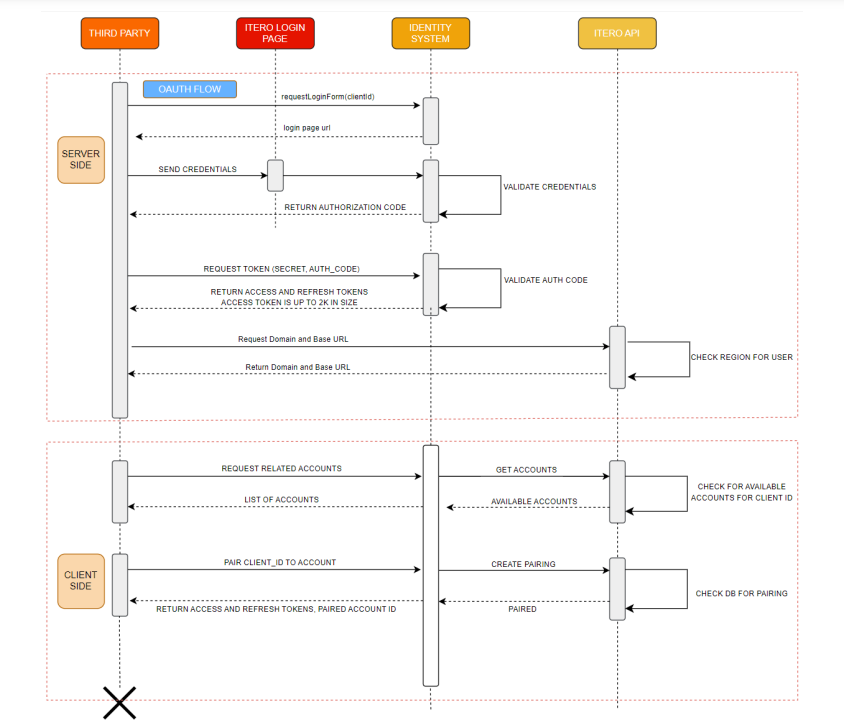
Figure 2: Authentication & Pairing Sequence Diagram