DPMS
iTero DPMS API enables third party users to create RXs using their own software, in addition to using an iTero scanner or myitero.com.
RX can be sent to iTero scanner to speed up patient visits and avoid unnecessary mistakes. Upon scan completion, the scan is available to the DPMS for retrieval.
Thanks to secure authentication, filling iTero credentials will be required one time only during the pairing process.
Check Authentication and Pairing to learn more about the pairing process.
Definitions, Acronyms, Abbreviations
| Term | Description |
|---|---|
| Myitero.com | iTero portal to manage account and cases |
| Production environment | Live environment |
| Redirect URL | URL to which the response should be returned |
| DPMS | Dental Practice Management System |
| DPMS Software / (ScanRequestPartner) | DPMS software company |
| DPMS User / (ScanRequestClient) | Specific doctor/clinic using the DPMS software |
| GUID | Globally Unique Identifier |
| Rx | A prescription for a scan |
| IDE (iTero Data Export) | Zip file that contains a scan's assets as well as the 3D model |
DPMS Overview
DPMS set of APIs includes the following:
- Get Practice Configuration
- Scan Request
- Delete RX
- Get Orders for Practice
- Get Order by RXID
- Get Full Rx
- Download Scan
- Get List of Screen Captures
- Download Single Screen Capture
- Patient Search - V2
- Patient Search - V3
- Patient's Details Update by Patient ID
- Patient's Details Update by Chart Number
Prerequisites
Authentication and pairing must be completed before calling the API, resulting in:
- access_token
- refresh_token
- {{Domain}} obtained through Discovery
- {{Path}} obtained through Discovery
DPMS Endpoints
Get Practice Configuration
Retrieve practice information.
| Endpoint information | |
|---|---|
| HTTP Method | GET |
| Path | {{Domain}}/{{Path}}/practice-configuration |
| API Version | 2 |
| Discovery Version | 2 |
Headers
Access token that is returned in pairing step.
Type: Bearer Token
Response
Response codes are:
| HTTP Status Code | Description | Scenario | Recommendation |
|---|---|---|---|
| 200 | OK | / | / |
| 401 | Unauthorized error | 1. Wrong token 2. Missing token |
Double-check that the call is using the correct pairing token |
| 500 | Internal Server error | / | A retry mechanism is recommended for this error message |
A JSON file containing details of the practice is returned. A list of the case type codes is displayed below the file.
{
    "Data": {
        "Header": {
            "CompanyId": number,
            "CompanyName": "string",
            "CountryCode": "string",
            "ReportDate": "date"
        },
        "UnitTypes": [
            {
                "Id": number,
                "Name": "string"
            },
            //... Additional entries follow the same JSON structure
        ],
        "Doctors": [
            {
                "Id": number,
                "Name": "string",
                "Licence": "string"
            },
            //... Additional entries follow the same JSON structure
        ],
        "Labs": [
            {
                "Id": number,
                "Name": "string",
                "DefinedCaseTypes": [
                    number,
                    number
                ],
                "Types": [
                    "Dental",
                    "Ortho"
                ],
                "Address": "string"
            },
            //... Additional entries follow the same JSON structure
        ]
    },
    "Status": 1
}
The table below lists the returned fields in Data section:
| Field | Type | Description | When to use | |||||||||||||||
|---|---|---|---|---|---|---|---|---|---|---|---|---|---|---|---|---|---|---|
| CompanyId | Number | ID of the paired account | Scan Request | |||||||||||||||
| CompanyName | String | Name of the paired account | Requires to keep data updated | |||||||||||||||
| CountryCode | String | Country Code for the paired account | ||||||||||||||||
| ReportDate | Date | Current date | Requires to keep data updated | |||||||||||||||
| UnitTypes | List |
List of unit types supported by the clinic
|
Deprecated | |||||||||||||||
| Doctors | List |
List of doctors associated with the account
|
Scan Request | |||||||||||||||
| Labs | List |
List of labs related to the account
|
DPMS can use this list to know from which labs to expect cases to arrive |
A status of 1 is returned upon success.
Unit Types
The following table lists the unit types:
| Unit Type Code | Unit Type |
|---|---|
| 1 | Regular |
| 2 | Crown |
| 3 | ¾ Crown |
| 4 | Implant Abutment |
| 5 | Inlay |
| 6 | Onlay |
| 7 | Veneer |
| 8 | Detachable |
| 9 | Missing (edentulous space) |
| 10 | Missing (no spaces) |
| 11 | Deciduous |
| 12 | Scan body |
| 13 | CerecGuide |
Scan Request
| Endpoint information | |
|---|---|
| HTTP Method | POST |
| Path | {{Domain}}/{{Path}}/scan-request |
| API Version | 2 |
| Discovery Version | 2 |
Allows to send an Rx with patient details to the clinic.
Note
A call to 'Get Practice Configuration' is necessary to obtain the required information for this endpoint.
Notes:
-
Lab and procedure are optional, they can be filled out on the scanner.
-
Clinical information is filled out on the scanner.
-
If the patient does not exist in the scanner’s list of patients a new patient will be created.
- Criteria for matching a patient is:
2.Last name
3.Chart number
-
It is recommended to call 'Patient Search' before 'Scan Request' to verify whether the patient that wants to be created already exists. This avoids creating duplicate patient records.
-
Once the 'date of birth' is stored for a patient, a 'Scan request' will not update the same patient with a different date of birth value.
-
If NIRI is available, the generated RX will honor the account's NIRI settings
Headers
Access token that is returned in pairing step.
Type: Bearer Token
Response
Upon a successful call, returns the RXID.
Response codes are:
| HTTP Status Code | Description | Scenario | Recommendation |
|---|---|---|---|
| 200 | OK | / | Example: { "Data": GUID, "Status": 1 } |
| 400 | Bad request | 1. Wrong DoctorId 2. Wrong data format |
Double-check if the data format is correct |
| 401 | Unauthorized error | 1. Wrong token 2. Missing token |
Double-check that the call is using the correct pairing token |
| 409 | Conflict | More than one patient is found with the passed chart number. The operation does not go through. This error code is available only if the account is configured to allow patient's details update. |
Double-check if there is duplicate chart number for different patient in system. Check with iTero if the update is enabled |
| 500 | Internal Server error | / | A retry mechanism is recommended for this error message |
Supported format for body is raw using JSON.
{
  "CompanyId": number,
  "DoctorId": number,
  "LicenseNumber": string,
  "PatientFirstName": string,
  "PatientLastName": string,
  "PatientChartNumber": string,
  "Gender": integer/string,
  "DateOfBirth": string/date,
  "Notes": string,
  "labId": number,
  "procedureMapId": number

}
| Field | Type | Is mandatory | Description |
|---|---|---|---|
| CompanyId | Number | Yes | ID of account |
| DoctorId | Number | Yes | ID of the doctor |
| LicenseNumber | String | No | Doctor’s license number. If sent, the doctor's license number will be updated for this RX and on. If empty, the current license number will be used. |
| PatientFirstName | String | Yes | Patient’s first name |
| PatientLastName | String | Yes | Patient’s last name |
| PatientChartNumber | String | Yes | Patient Chart Number or Medical Record Number (MRN) |
| Gender | String/Number | No | Patient's gender. Use either: “Male”/”Female” or 109 (for male)/102 (for female) |
| DateOfBirth | Date/Time | No | Patient’s birth date. Optional formats: YYYY-MM-DDTHH:MM:SS.SSSZ or YYYY-MM-DD |
| Notes | String | No | Any free text |
| labId | Number | No | ID of the destination lab |
| procedureMapId | Number | No | ID of the desired procedure (find options below) |
Procedure selection
To pass procedure, procedure type and type of destination (lab, myitero.com) use the corresponding procedureMapId.
The options for this parameter are below.
Examples:
-
To select a Fixed restorative scan which is sent to a restorative lab - use procedureMapId 30
-
To select an Invisalign, First Aligners scan - use procedureMapId 4
| Procedure Name | Procedure Type | Send To Type | ProcedureMapID |
|---|---|---|---|
| Study Model - iRecord | N/A | Lab | 1 |
| Study Model - iRecord | iCast | No Send To | 2 |
| Study Model - iRecord | N/A | No Send To | 54 |
| Study Model - iRecord | N/A | Lab | 78 |
| Study Model - iRecord | N/A | myitero.com | 80 |
| Invisalign - Vivera | Aligners | No Send To | 3 |
| Invisalign - Vivera | First Aligners | No Send To | 4 |
| Invisalign - Vivera | First Palatal Expander | No Send To | 5 |
| Invisalign - Vivera | Vivera Retainer | No Send To | 6 |
| Invisalign - Vivera | Invisalign Retainer | No Send To | 7 |
| Implant Planning | Surgical guide Tooth supported | Lab | 24 |
| Implant Planning | Surgical guide Tissue Supported | Lab | 25 |
| Implant Planning | Surgical guide Bone supported | Lab | 26 |
| Implant Planning | N/A | Lab | 44 |
| Implant Planning | Surgical planning only - No guide | Lab | 46 |
| Implant Planning | Surgical guide Tooth supported | No Send To | 59 |
| Implant Planning | Surgical guide Tissue Supported | No Send To | 60 |
| Implant Planning | Surgical guide Bone supported | No Send To | 61 |
| Implant Planning | Surgical planning only - No guide | No Send To | 64 |
| Implant Planning | N/A | No Send To | 65 |
| Implant Planning | Surgical guide Tooth supported | myitero.com | 85 |
| Implant Planning | Surgical guide Tissue Supported | myitero.com | 86 |
| Implant Planning | Surgical guide Bone supported | myitero.com | 87 |
| Implant Planning | Surgical planning only - No guide | myitero.com | 90 |
| Implant Planning | N/A | myitero.com | 91 |
| Fixed Restorative | N/A | Lab | 30 |
| Fixed Restorative | N/A | No Send To | 62 |
| Fixed Restorative | N/A | myitero.com | 88 |
| Denture/Removable | Partial Denture/Framework | Lab | 20 |
| Denture/Removable | Immediate Denture | Lab | 21 |
| Denture/Removable | Full Denture Tissue Based | Lab | 22 |
| Denture/Removable | Full Denture Implant Based | Lab | 23 |
| Denture/Removable | N/A | Lab | 48 |
| Denture/Removable | Partial Denture/Framework | No Send To | 57 |
| Denture/Removable | Immediate Denture | No Send To | 58 |
| Denture/Removable | Full Denture Tissue Based | No Send To | 70 |
| Denture/Removable | Full Denture Implant Based | No Send To | 71 |
| Denture/Removable | N/A | No Send To | 72 |
| Denture/Removable | Partial Denture/Framework | myitero.com | 83 |
| Denture/Removable | Immediate Denture | myitero.com | 84 |
| Denture/Removable | Full Denture Tissue Based | myitero.com | 95 |
| Denture/Removable | Full Denture Implant Based | myitero.com | 96 |
| Denture/Removable | N/A | myitero.com | 97 |
| Denture/Removable | Full Immediate Denture | Lab | 104 |
| Denture/Removable | Full Immediate Denture | No Send To | 105 |
| Denture/Removable | Full Immediate Denture | myitero.com | 107 |
| Appliance | Night guard | Lab | 8 |
| Appliance | Bite Split | Lab | 9 |
| Appliance | Sports/Mouth guard | Lab | 10 |
| Appliance | Apnea/Sleep Appliance | Lab | 11 |
| Appliance | Ortho Appliance | Lab | 13 |
| Appliance | Night guard | Lab | 14 |
| Appliance | Bite Split | Lab | 15 |
| Appliance | Sports/Mouth guard | Lab | 16 |
| Appliance | Apnea/Sleep Appliance | Lab | 17 |
| Appliance | Ortho Appliance | Lab | 19 |
| Appliance | N/A | Lab | 41 |
| Appliance | N/A | Lab | 42 |
| Appliance | Night guard | No Send To | 55 |
| Appliance | Bite Split | No Send To | 56 |
| Appliance | N/A | No Send To | 63 |
| Appliance | Sports/Mouth guard | No Send To | 66 |
| Appliance | Apnea/Sleep Appliance | No Send To | 67 |
| Appliance | Ortho Appliance | No Send To | 69 |
| Appliance | Night guard | myitero.com | 81 |
| Appliance | Bite Split | myitero.com | 82 |
| Appliance | N/A | myitero.com | 89 |
| Appliance | Sports/Mouth guard | myitero.com | 92 |
| Appliance | Apnea/Sleep Appliance | myitero.com | 93 |
| Appliance | Ortho Appliance | myitero.com | 94 |
Delete RX
Removes the RX from the scanner and from myitero.com
| Endpoint information | |
|---|---|
| HTTP Method | DELETE |
| Path | {{Domain}}/{{Path}}/scan-request/:RXID |
| API Version | 2 |
| Discovery Version | 2 |
Headers
Access token that is returned in pairing step.
Type: Bearer Token
Path Variables
Call parameters should include the following:
- RXID: Obtained as a response in Scan Request endpoint
Response
The delete RX returns the Rx ID, as a GUID.
The table below describes the optional codes returned by the API:
Response codes are:
| HTTP Status Code | Description | Scenario | Recommendation |
|---|---|---|---|
| 200 | OK | / | Example: { "Data": "a09292aa-8b06-45f9-a73c-350538bb32f3", "Status": 1 } |
| 400 | Bad request | Wrong RXID | Double-check if the data format is correct |
| 401 | Unauthorized error | 1. Wrong token 2. Missing token |
Double-check that the call is using the correct pairing token |
| 500 | Internal Server error | / | A retry mechanism is recommended for this error message |
Get Orders for Practice
| Endpoint information | |
|---|---|
| HTTP Method | GET |
| Path | {{Domain}}/{{Path}}/orders/practice |
| API Version | 2 |
| Discovery Version | 2 |
Headers
Access token that is returned in pairing step.
Type: Bearer Token
Parameters
Retrieved scans can be filtered by the following parameters:
| Key | Is mandatory | Description |
|---|---|---|
| Offset | Yes | Number of orders to skip. Orders are returned from oldest to the most recent. In order to get to the more recent orders use offset variable. Paging is implemented by the parameters Offset and pageSize together. |
| pageSize | Yes | Number of orders to retrieve. Maximum number is 1024 |
| dateTo | No | Scans dated up to this date will be returned |
| dateFrom | No | Scans dated from this date on will be returned |
| chartNumber | No | Scans with the specified chart number will be returned |
Response:
Response codes are:
| HTTP Status Code | Description | Scenario | Recommendation |
|---|---|---|---|
| 200 | OK | / | / |
| 401 | Unauthorized error | 1. Wrong token 2. Missing token |
Double-check that the call is using the correct pairing token |
| 500 | Internal Server error | / | A retry mechanism is recommended for this error message. |
{
    "Data": {
        "HasMore": boolean,
        "PageSize": number,
        "Offset": number,
        "Results": [
            {
                "ProcedureName": string,
                "ProcedureTypeName": string,
                "RxId": GUID,
                "OrderId": number,
                "OrderCode": string,
                "ScanningDate": date,
                "DoctorId": number,
                "ScanningOperatorId": number,
                "ScanningOperatorName": string,
                "ScanningTime": number,
                "PatientFirstName": string,
                "PatientLastName": string,
                "PatientChartNumber": string,
                "CaseType": string,
                "CompanyId": number,
                "CompanyName": string,
                "LabId": number,
                "LabName": string,
                "Preps": list,
                "Notes": string,
                "ViewerUrl": string,
                "ThumbnailsDownloadUrl": string,
                "IdeFileUrl": string,
                "ScreenCaptureFileUrl": string,
                "Status": string,
                "DueDate": datetime,
                "PatientId": number,
                "DoctorName": string,
                "DoctorLicenseNumber": string,
                "Urls": {
                    "MyiTero3DViewerUrl": string,
                    "IDEFileUrl": string,
                    "ScreenCaptureUrl": string,
                    "ThumbnailsUrl": string
                        },
                "ScannerModelDescription": string,
                "ScannerModelId": int
            },
            {
              (...more scans)
            }
                  ]
    },
    "Status": 1
}
Below is a table describing the information that has been returned in the Data section of the response:
| Field | Sub Field | Type | Description |
|---|---|---|---|
| HasMore | Boolean | True if more orders are available for retrieval, otherwise, false | |
| PageSize | Number | Number of orders to retrieve. Maximum number is 1024 | |
| Offset | Number | Orders offset to retrieve from, use 0 to get the most recent ones. Use a positive number to get older orders | |
| Results | ProcedureName | String | Name of Procedure |
| ProcedureTypeName | String | Name of procedure type | |
| RxId | GUID | Id of Rx | |
| OrderId | Number | Order Id of the order available for retrieval | |
| OrderCode | String | Order code of the order available for retrieval | |
| ScanningDate | Date | Order’s scanning date time (Always in GMT + 0) using ISO_8601 format | |
| DoctorId | Number | Id of the person that performed the scan | |
| ScanningOperatorId | Number | Id of operator | |
| ScanningOperatorName | String | Name of operator | |
| ScanningTime | Number | Scanning time in seconds | |
| CompanyId | Number | Id of the company that performed the scan | |
| PatientFirstName | String | Order’s patient first name | |
| PatientLastName | String | Order’s patient last name | |
| PatientChartNumber | String | Order’s patient chart number | |
| CaseType | String | Case type: • Restorative • iRecord • iCast • Invisalign • Invisalign + iRecord |
|
| CompanyId | Number | Id of performing practice | |
| Company Name | String | Name of performing practice | |
| LabId | Number | Id of lab which scan is sent to | |
| LabName | String | Name of lab which scan is sent to | |
| Preps | List | Array of preps with their attributes, such as type of unit, tooth number etc. Example: "Preps": [ { "AdaId": 4, "UnitTypeId": 2, "UnitTypeName": "Crown", "BridgeId": null } ], |
|
| Notes | String | Notes of the doctor, if there is no note will return with null | |
| ViewerUrl | String | MyiTero.com 3D scan viewer URL | |
| ThumbnailsDownloadUrl | String | URL to retrieve Thumbnails artifacts | |
| IdeFileUrl | String | URL to retrieve STL/PLY artifact | |
| ScreenCaptureFileUrl | String | URL to retrieve screenshots taken for that order (if any) | |
| Status | String | Order status: • Completed • iTero Modeling • Lab Review • Scanning • iTero Milling • Exporting to Doctor Site • Align Production |
|
| DueDate | Datetime | Restorative orders - Expected delivery date of the product from the lab. Invisalign orders - Order creation date. |
|
| PatientId | Number | PatientID is a deprecated value | |
| DoctorName | String | Doctor's full name | |
| Doctor's license number | String | Doctor's license number | |
| Urls | String | Sub fields: MyiTero3DViewerUrl: MyiTero.com online 3D scan viewer URL IDEFileUrl: URL to retrieve STL/PLY, thumbnails, Rx, and XML file ScreenCaptureUrl: URL to retrieve screen captures (if any) ThumbnailsUrl: URL to retrieve gallery images of the scan Use the returned URLs to download assets. The full call is described in this document in Download Scan paragraph. |
|
| ScannerModelDescription | String | Scanner model used to create the order | |
| ScannerModelId | Int | Scanner model unique identifier |
A status of 1 is returned upon success.
Note
Only use the returned links to download assets. This will make sure the call does not break in case iTero changes the URLs for downloads.
Procedures and types
| ID | Procedure Name | Type Name |
|---|---|---|
| 1 | Study Model - iRecord | Ortho Model/iCast |
| 2 | Invisalign / Vivera | Invisalign Aligners |
| Invisalign First Aligners | ||
| Invisalign First Palatal Expander | ||
| Vivera Retainer | ||
| Invisalign Retainer | ||
| 3 | Implant Planning | Surgical guide Tooth supported |
| Surgical guide Tissue Supported | ||
| Surgical guide Bone supported | ||
| 4 | Fixed Restorative | |
| 5 | Denture/Removable | Partial Denture/Framework |
| Immediate Denture | ||
| Full Immediate Denture | ||
| Full Denture Tissue Based | ||
| Full Denture Implant Based | ||
| 6 | Appliance | Night guard |
| Bite Splint | ||
| Sports/Mouth guard | ||
| Apnea/Sleep Appliance | ||
| Ortho Appliance |
Scanner Models Description
| Scanner Model ID | Scanner Model Description |
|---|---|
| 1 | HDU |
| 2 | HD2.9 |
| 3 | iTero Element |
| 4 | Element Flex |
| 5 | HD2 |
| 6 | HD2.1 |
| 7 | HD2.05 |
| 8 | Element 2 |
| 9 | Element 2 5D |
| 10 | Flex 5D |
| 11 | Flex 5D Ready |
| 12 | Element 2 5D Ready |
| 13 | 5D Wand UPG Kit |
| 14 | 5D Flex Wand UPG Kit |
| 15 | iTero Element 2 Plus, Cart Configuration |
| 16 | iTero Element 2 Plus, Mobile Configuration |
| 17 | iTero Element 5D Plus, Cart Configuration |
| 18 | iTero Element 5D Plus, Mobile Configuration |
| 19 | iTero Element 5D Plus Lite, Cart Configuration |
| 20 | iTero Element 5D Plus Lite, Mobile Configuration |
| 21 | iTero Lumina Cart Configuration |
| 22 | iTero Lumina Mobile Configuration |
| 23 | iTero Lumina Wand UPG Kit Cart |
| 24 | iTero Lumina Wand UPG Kit Mobile |
| 25 | Flex Plus |
| 26 | iTero Element 5D LC - Plus Lite package |
| 27 | iTero Element 5D LC - Plus package |
| 28 | iTero Lumina Pro Mobile Configuration |
| 29 | iTero Lumina Pro Cart Configuration |
| 30 | iTero Lumina PC Configuration |
| 31 | iTero Lumina Essential PC Configuration |
Backwards Compatibility
iTero new RX uses Procedures and types. To keep backwards compatibility, the endpoint also returns the equivalent case type. Use case types if the received procedure is null.
Note
With iTero new RX, new procedures were introduced that don't have a matching case type. The returned case type is the best match.
Scan Status
Scans can be returned with different statuses depends on the case flow.
The following table lists the optional statuses:
| Status | Stage in flow | Cases | How to handle |
|---|---|---|---|
| Completed | Case is available for download after scanning | All cases but Invisalign | Case is available for the DPMS |
| iTero Modeling | Case was sent to modeling by the lab | Restorative cases/cases that are sent to lab | |
| Lab Review | Cases are back to the lab after modeling | Restorative cases/cases that are sent to lab | After modeling the order files are changed. Consider redownload |
| Scanning | Case is returned to the clinic by the lab | Restorative cases/cases that are sent to lab | Consider alerting the doctor if a case is back (an alert is shown on the scanner) |
| iTero Milling | Case was sent to milling by the lab | Restorative cases/cases that are sent to lab | |
| Exporting to Doctor Site | Case was sent to IDS (Invisalign site) | Invisalign cases | |
| Align Production | Status is used in various scenarios, when the case is processed. | Vary | This is a temporary status. |
Note that a scan can be listed with different statuses as it goes in the flow. The order ID will not change while its status will change.
Listed Orders
User can retrieve a list of clinic’s scans. The retrieved scans are orders that meet the criteria. An order will be listed when it has zip file, thumbnails and it is ready on myitero.com.
Note
In order to have the zip file ready, each user of a clinic must have export settings defined. A default is currently applied, but if a user wants different export settings, they must be modified. Selecting export settings is done in myitero.com, in settings. Below is an example for selected settings:
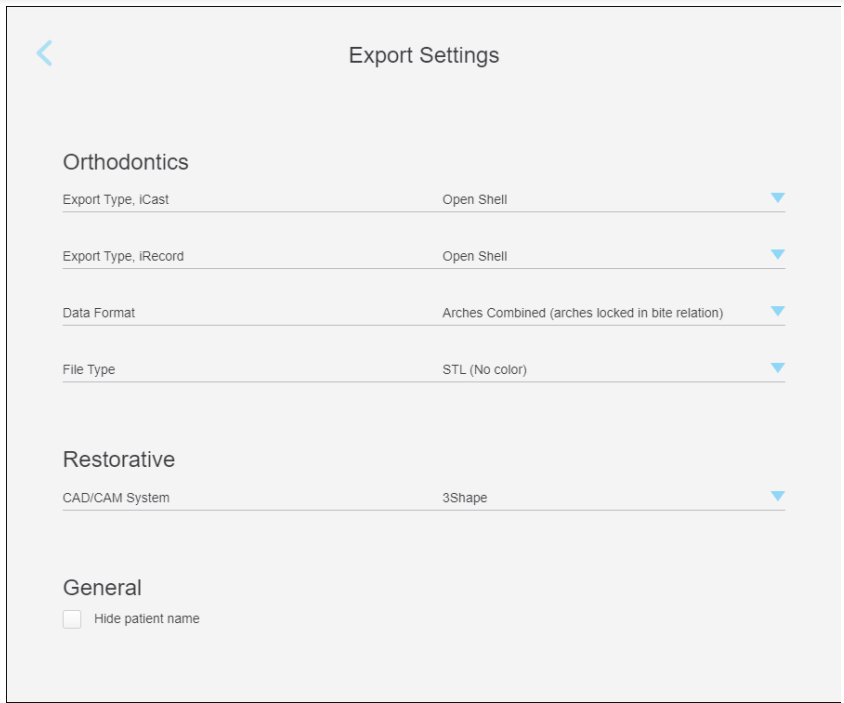
A third party can choose to select export settings to be applied to all clinics that are part of the integration. So all downloaded files are consistent.
Note that this is optional, and if done, it will not be reflected on myitero.com. For more information please refer to the 'Export Settings' section under 'Data Dictionary'.
Link to iTero Viewer
The returned response provides a direct link to view the case in iTero 3D viewer (ViewerUrl).
Note
- It is required to log in to myitero.com to see the scan (once per session).
- In order to view scans of another doctor in the clinic, a Full Order Visibility must be granted.Please contact iTero support.
Get Order by RXID
| Endpoint information | |
|---|---|
| HTTP Method | GET |
| Path | {{Domain}}/{{Path}}/orders/:rxId |
| API Version | 2 |
| Discovery Version | 2 |
Displays the same information as Get Orders for Practice but for one specific order.
Headers
Access token that is returned in pairing step.
Type: Bearer Token
Path Parameters
Pass RxID (GUID) to the call.
Response
Response codes are:
| HTTP Status | Code | Description Scenario | Recommendation |
|---|---|---|---|
| 200 | OK | / | / |
| 400 | Bad request | Wrong RXID format | Double-check the data format |
| 401 | Unauthorized error | 1. Wrong token 2. Missing token |
Double-check that the call is using the correct pairing token |
| 404 | Not found | 1. Wrong RXID 2. The scan is not yet performed |
1. Double-check if the RXID is correct 2. Waiting for performing |
| 500 | Internal Server error | / | A retry mechanism is recommended for this error message |
In case of returned code of 200, the following response will be returned.
Response returns the details for the specific scan:
{
    "Data": {
        "ProcedureName": "string",
        "ProcedureTypeName": "string",
        "RxId": "GUID",
        "OrderId": "number",
        "OrderCode": "string",
        "ScanningDate": "date",
        "DoctorId": "number",
        "ScanningOperatorId": "number",
        "ScanningOperatorName": "string",
        "ScanningTime": "number",
        "PatientFirstName": "string",
        "PatientLastName": "string",
        "PatientChartNumber": "string",
        "CaseType": "string",
        "CompanyId": "number",
        "CompanyName": "string",
        "LabId": "number",
        "LabName": "string",
        "Preps": "list",
        "Notes": "string",
        "ViewerUrl": "string",
        "ThumbnailsDownloadUrl": "string",
        "IdeFileUrl": "string",
        "ScreenCaptureFileUrl": "string",
        "Status": "string",
        "DueDate": "datetime",
        "PatientId": "number",
        "DoctorName": "string",
        "DoctorLicenseNumber": "string",
        "Urls": {
            "MyiTero3DViewerUrl": "string",
            "IDEFileUrl": "string",
            "ScreenCaptureUrl": "string",
            "ThumbnailsUrl": "string"
                },
        "ScannerModelDescription": "string",
        "ScannerModelId": "int"
    },
    "Status": 1
}
Below is a table describing the information that has been returned in the Data section of the response:
| Field | Type | Description |
|---|---|---|
| ProcedureName | String | Name of Procedure |
| ProcedureTypeName | String | Name of procedure type |
| RxId | GUID | Id of Rx |
| DoctorId | Number | Id of the doctor |
| ScanningDate | Date | Order’s scanning date time (Always in GMT + 0) using ISO_8601 format |
| ScanningOperatorId | Number | Id of person that performed the scan |
| ScanningOperatorName | String | Name of person that performed the scan |
| ScanningTime | Number | Number of seconds of scan |
| PatientFirstName | String | Order’s patient’s first name |
| PatientLastName | String | Order’s patient’s last name |
| PatientChartNumber | String | Order’s patient Chart number |
| CaseType | String | Case type: • Restorative • iRecord • iCast • Invisalign • Invisalign + iRecord |
| CompanyId | Number | ID of the company that performed the scan |
| CompanyName | String | Name of the company that performed the scan |
| LabId | Number | ID of the lab that received the scan |
| LabName | String | Name of the lab that received the scan |
| Preps | List | Array of preps with their attributes, such as type of unit, tooth number etc. |
| Notes | String | Notes of the doctor, if there is no note will return with null |
| ViewerUrl | String | MyiTero.com 3D scan viewer URL |
| ThumbnailsDownloadUrl | String | URL to retrieve STL/PLY artifact |
| IdeFileUrl | String | URL to retrieve Thumbnails artifacts |
| ScreenCaptureFileUrl | String | URL to retrieve screen captures (if any) |
| Status | String | Order status: • Completed • iTero Modeling • Lab Review • Scanning • iTero Milling |
| DueDate | Datetime | Restorative orders - Expected delivery date of the product from the lab. Invisalign orders - Order creation date. |
| PatientId | Number | PatientID is a deprecated value |
| DoctorName | String | Doctor's full name |
| DoctorLicenseNumber | String | Doctor's license number |
| Urls | String | Sub fields: MyiTero3DViewerUrl: MyiTero.com 3D scan viewer URL IDEFileUrl: URL to retrieve Thumbnails artifacts ScreenCaptureUrl: URL to retrieve screen captures (if any) ThumbnailsUrl: URL to retrieve STL/PLY artifact |
| ScannerModelDescription | String | Scanner model used to create the order |
| ScannerModelId | Int | Scanner model unique identifier |
Status of the call will be 1 for a successful call. Otherwise 0.
Refer to Procedures and Types above for procedure types.
Note
Only use the returned links to download assets. This will make sure the call does not break in case iTero changes the URLs for downloads.
Get Full RX
Returns the scan’s clinical information after the scan is completed, enabling retrieval of the RX without downloading the 3D model.
| Endpoint information | |
|---|---|
| HTTP Method | GET |
| Path | {{Domain}}/{{Path}}/GetRX/GetFullRX/:rxid |
| API Version | 2 |
| Discovery Version | 2 |
Should you parse order information through the IDE’s XML or the GetFullRx endpoint?
GetFullRx endpoint doesn't return information about the specific files contained in the IDE. The Export Format, the number and name of files, transformation coordinates, and scan range are not present in GetFullRx.
Note
- If obtaining these values is necessary, parsing the XML will be required.
- The XML file and the GetFullRx JSON response have different key names and hierarchical structure.
If the intention is to download the IDE’s for every order, the recommended path is to parse the XML file instead of this JSON endpoint, since the XML has more information.
The following table lists some key content differences between the order information in GetFullRx JSON response, compared to the IDE’s XML:
| XML | JSON |
|---|---|
| ActualUsedTransformsTransformation | (Not present) |
| Modeled | (Not present) |
| PracticeShipToAddress | (Not present) |
| ScanRange: UpperRange LowerRange |
(Not present) |
| iTeroExport Version | (Not present) |
| PracticeShipToAddress | (Not present) |
| ExportedObjectsObject | (Not present) |
Terminology
- Transformation: Applies coordinates so that 3D viewers or CAD/CAM software can open the case in the exact position every time.
- Modeled: If a case has gone to modeling services.
Header
Access token that is returned in pairing step. Type ‘Bearer Token’
Response
| HTTP Status Code | Description | Scenario | Recommendation |
|---|---|---|---|
| 200 | OK | / | / |
| 400 | Bad request | Wrong RXID format | Check if the RXID format is incorrect |
| 401 | Unauthorized error | 1. Wrong token 2. Missing token |
Double-check that the call is using the correct pairing token |
| 404 | Not found | 1. Wrong RXID 2. The scan is not yet performed |
1. Double-check if the RXID is correct 2. Waiting for performing |
| 500 | Internal Server error | / | A retry mechanism is recommended for this error message |
If the server responds with HTTP status code 200, the response will follow the schema outlined below:
{
  "Version": 1,
  "ID": "GUID",
  "CompanyID": "int",
  "Patient": {
    "Id": "int", //This value is deprecated and should be ignored
    "UID": "GUID",
    "FirstName": "string",
    "LastName": "string",
    "ChartNumber": "string",
    "RowStatus": 1,
    "DateOfBirth": "datetime",
    "Gender": "int",
    "MI": null,
    "ZipCode": null,
    "DateUpdated": "datetime"
  },
  "Order": {
    "ID": "int",
    "Code": "string",
    "Status": null,
    "State": null,
    "CaseTypeId": "int",
    "ScanDate": "datetime",
    "DueDate": "datetime",
    "ShipToId": "int",
    "ShipToName": "string",
    "DirectToLab": "bool",
    "IsBracketsPresent": "bool",
    "HasNIRI": "bool",
    "NIRIhasOnlyIOC": "bool",
    "ProcedureId": "int",
    "ProcedureMapId": "int",
    "ProcedureTypeId": "int"
  },
  "Doctor": {
    "Id": "int",
    "Name": "string",
    "Licence": "string"
  },
  "Notes": "string",
  "Teeth": [ //Nullable
    {
      "ToothID": "int",
      "UnitTypeID": "int",
      "SpecificationId": "int",
      "MaterialID": "int",
      "ImplantTypeID": "int", //Nullable
      "ShadeIncisal": "int", //Nullable
      "ShadeBody": "int", //Nullable
      "ShadeGingival": "int", //Nullable
      "PreparationDesignBuccal": "string",
      "PreparationDesignBuccalId": "string",
      "PreparationDesignLingual": "string",
      "PreparationDesignLingualId": "string",
      "MarginDesignBuccal": "string",
      "MarginDesignBuccalId": "string",
      "MarginDesignLingual": "string",
      "MarginDesignLingualId": "string",
      "StumpfShade": "string",
      "Analog": null, //Deprecated Value, not in use.
      "CAMarginStyle": null, //Optional
      "CAMarginStyleId": null, //Optional
      "CAMaterialID": null, //Optional
      "AbutmentType": "int", //Nullable
      "AbutmentMarginStyle": null, //Optional
      "AbutmentMarginStyleId": null, //Optional
      "AbutmentMaterialId": "int", //Nullable
      "BridgeIndex": "int",
      "ToothInBridgeTypeID": "int", //Nullable
      "IsValidForSend": "bool", //Will always be true
      "ShadeSystemId": "int",
      "PonticDesignID": "int",
      "ImplantBasedRestorationTypeId": "int",
      "AdditionalDies": "int",
      "DieDitch": "int"
    }
  ],
  "Bridges": [
    {
      "FromToothID": "int",
      "ToToothID": "int",
      "FromAdaID": "int",
      "ToAdaID": "int",
      "BridgeTypeId": "int",
      "BridgeIndex": "int",
      "FromTooth": {\
       //(Same keys as a ‘Teeth’ element)
      },
      "ToTooth": {
       //(Same keys as a ‘Teeth’ element)
      }
    }
  ],
  "CompletionLevel": "int",
  "ShadeSystemId": "int",
  "TechnicalNotes": null, //Notes from the clinic that are added to the Rx when scanning
  "PrePrepScan": "bool",
  "MultiBiteScan": "bool",
  "AligntechNotes": "string", //Nullable
  "OrderInformation": {
    "LocalIdeCadCamSystemId": "int",
    "IdeCadCamSystemId": "int",
    "IdeProductionCenterId": "int",
    "IdxProductionCenterId": "int",
    "DieDitch": "bool",
    "AdditionalDies": "int",
    "NumOfModels": "int",
    "IntegrationCompany": "int"
  },
  "TreatmentStage": null, //Only relevant for Invisalign
  "AlignerNumber": null, // Only relevant for Invisalign. Optional
  "HasNIRI": "bool",
  "BillToAddress": "string", //Nullable
  "ShipToAddress": "string", //Nullable
  "PayerAddress": "string", //Nullable
  "CompanyName": null,
  "ForceRxFormUpdate": "bool",
  "ToothNumberingSystem": "int",
  "ApplianceDetails": null, //Type of appliances
  "DentureDetails": null, //Type of denture
  "MultiBiteRestoScan": {
    "Enabled": "bool",
    "Includes": [
      //This array is empty if the field 'Enabled' is set to false
      "string",
      "string", //Nullable
      "string", //Nullable
      "string" //Nullable
    ]
  },
  "EmergenceProfile": "bool",
  "IsDraft": "bool",
  "StatusId": "int",
  "IsActive": "bool"
}
Map Rx ID’s to values
In order to obtain the relevant string definition for each numeric ‘ID’ field that is obtained, iTero provides an Rx-definition JSON file with a hierarchical structure.
Please refer to ‘Rx Definition’ section under ‘Data Dictionary’
Download Scan
Download URL's must be retrieved from either 'Get Orders' endpoint, or 'Get Order by RxID'. It is imperative to obtain URL's from these endpoints as links are dynamic and may change over time.
All iTero scans have three available asset types for download:
- IMAGE_GALLERY – for image thumbnails of the scan
- IDE – for STL/PLY file (along with thumbnails for ortho cases, metadata and XML files)
- SCREEN_CAPTURE - for screen captures
Info
A link to screen captures is always provided, even if no captures were taken. If no captures are available, the call will return a 204 (No Content) error code. Screen captures can be taken at any time after the scan is completed. Once captures are taken, they will become available for download.
Header
Use authentication type: ‘Bearer Token’, with the Pair access token for the account.
Response
Response codes are:
| HTTP Status Code | Description | Scenario | Recommendation |
|---|---|---|---|
| 200 | OK | File was downloaded successfully | / |
| 204 | No content | There are no screenshots created for the scan | / |
| 400 | Bad request | Wrong asset format | Double-check that the call is using the correct asset name |
| 401 | Unauthorized error | 1. Wrong token 2. Missing token |
Double-check that call is using the correct pairing token |
| 404 | Not found | 1. Wrong orderid 2. Wrong asset type 3. 3D/iDE file not yet ready |
This error code will trigger the generation of the 3D file (iDE) if not generated; Therefore, a retry mechanism is recommended. Make sure to wait enough time as the file generation time varies around 1-2 minutes. |
| 500 | Internal Server error | / | A retry mechanism is recommended for this error message. |
Downloaded Artifacts
All artifact types are downloaded in a zip format.
| Asset Type | Notes | Artifacts |
|---|---|---|
| iDE | 3D file format meets the selected format by the user | • 3D files (STL/PLY) |
| • RX in html format | ||
| • Scan metadata in XML format | ||
| • Thumbnails for ortho case | ||
| IMAGE_GALLERY | Also called thumbnails | Six photos (JPG) of the scan of different views |
| SCREEN_CAPTURE | A link to screen captures is provided regardless if screen captures were taken. The call will return error code 204 (no content) in case no captures are available. Screen captures can be taken at any time after the scan is completed (from the scanner or in myitero.com), so if taken in a later time, they will be available for download. | • Entire scanner window |
| • 3D image | ||
| • 2D NIRI image (iTero Element 5D only) | ||
| • 2D color image (iTero Element 5D only) |
Export Format
A scan will be converted to the format that is selected by the doctor on myitero.com (the selection is individual per user):
-
If changing the Export Format, the change will apply to all cases downloaded from this point on, including old cases.
-
Downloading a scan in a different format on demand can be done from myitero.com.
-
A third party can choose to select export settings to all clinics that are part of the integration. In case this option is used, it will not be reflected on myitero.com. In order to do it please contact iTero Professional Services, or iteroapisupport@aligntech.com
Default Export Settings
If no export settings are selected, the scan files will be generated by default settings:
| Parameter | Default Value |
|---|---|
| Export Type iCast | Solid Model with Low Profile Base |
| Export Type iRecord | Solid Model with Low Profile Base |
| Data Format | File per arch (each arch with teeth up) |
| File Type | STL |
| CAD CAM System | Color Export Open Model |
Hide Patient Name
Patient name can be hidden from metadata file (XML) if selected. It will appear in the metadata returned by the API calls of 'Get Orders for Practice' (4.4) and get order by RxID (4.5), but will be removed from the metadata that is downloaded with the 3D file.
Hiding a patient name is done from myitero.com in the 'Export Settings' window:
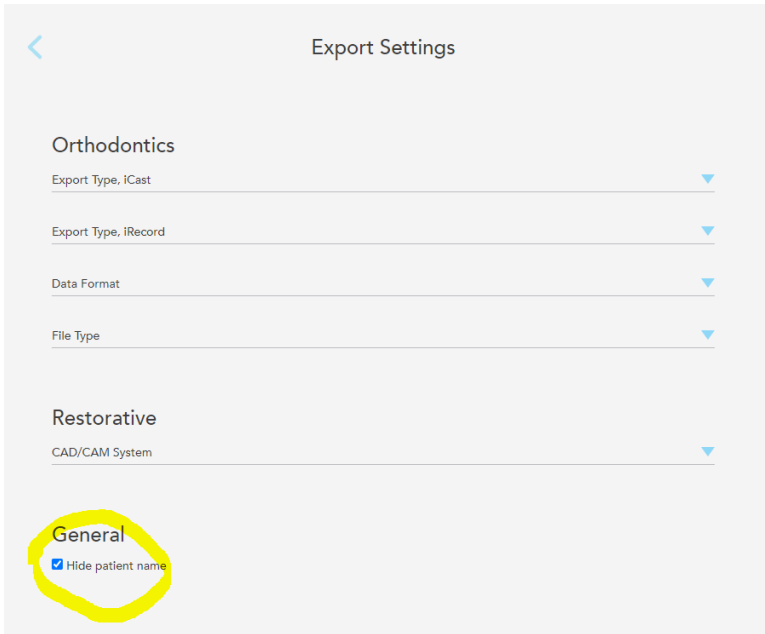
Each doctor has to select this option to apply it to his orders.
Download Scan On Demand
Allows to download a scan in more than one export setting.
| Endpoint information | |
|---|---|
| HTTP Method | POST |
| Path | {{Domain}}/{{Path}}/order/:orderID/export |
| API Version | 2 |
| Discovery Version | 2 |
Prerequisites
Retrieve the scan metadata from 'Get Orders for Practice' or 'Get Order By RxID' and use the ProcedureName field to determine the scan type.
| Procedure | Scan Type |
|---|---|
| Invisalign / Vivera | Orthodontic |
| Study Model / iRecord | Orthodontic |
| Appliance | Orthodontic |
| Fixed Restorative | Restorative |
| Denture | Restorative |
| Implant Planning | Restorative |
Flow
- Initiate export — Send a POST request with export parameters. Returns
202 AcceptedwithStatus: Processingwhile the IDE is being generated. - Poll for readiness — Re-issue the request every 40-50 seconds until the response returns
200 OKwithStatus: Ready. - Download file — Use the
Download3dModelURL from the200response to download the IDE via GET (requires bearer token).
Path Parameters
| Parameter | Type | Mandatory | Description |
|---|---|---|---|
OrderId |
string | Yes | ID of the order to export. |
Query Parameters
Note
Parameters vary depending on the type of order to be downloaded (Restorative or Orthodontic). Only parameters relevant to the current order should be passed on the call.
Passing no export parameters, omitting a required parameter, or including a parameter from the wrong scan type returns a 400 Bad Request response.
| Scan Type | Required Parameters | Do Not Pass |
|---|---|---|
| Orthodontic | ExportType, DataFormat, FileType |
CadCamSystemId |
| Restorative | CadCamSystemId |
ExportType, DataFormat, FileType |
| Scan Type | Optional Parameters |
|---|---|
| All Scan Types | PatientAnonymization |
Note
For more information about export settings, refer to the Export Settings section under Data Dictionary.
Orthodontic scans:
| Export Setting | ID | Name |
|---|---|---|
| ExportType | ||
| 1 | Open Shell | |
| 4 | Solid Model with Low Profile Base | |
| 5 | Hollow ABO Base | |
| 8 | Solid ABO Base | |
| DataFormat | ||
| 1 | One File (arches locked in occlusion) | |
| 2 | Two Files (arches oriented in occlusion) | |
| 3 | Two Files (each arch with teeth up) | |
| FileType | ||
| 1 | STL | |
| 2 | PLY | |
| 3 | STL + PLY |
Restorative scans:
| Export Setting | ID | Name |
|---|---|---|
| CadCamSystemId | ||
| 1 | CIL | |
| 2 | 3Shape | |
| 3 | Dental Wings | |
| 4 | Straumann | |
| 5 | TDS | |
| 6 | 5 Axis | |
| 7 | Biomet 3i | |
| 8 | DIO | |
| 9 | AmannGirrbach Ceramill | |
| 10 | Implants and Other Exports - Open Model | |
| 11 | Implants and Other Exports - Closed Model | |
| 12 | E4D | |
| 14 | exocad (legacy) | |
| 15 | Sirona inLab | |
| 16 | exocad (2014 or later) | |
| 17 | Color Export - Open Model | |
| 18 | Color Export - Closed Model | |
| 20 | exocad with color (2017 and later) | |
| 21 | ZFX | |
| 27 | Glidewell - Fast Design |
Parameters relevant for all scans:
-
PatientAnonymization: A boolean flag indicating whether patient data should be anonymized.- true
- false
Headers
Access token that is returned in pairing step.
Use type of ‘Bearer Token’
Response
The response contains either a Link or Download3dModel key.
The value of the Status key determines which is returned.
{
  "Status": "string",
  "Link": "string",             // Only present when Status is "Processing"
  "Download3dModel": "string",  // Only present when Status is "Ready"
  "ExportSettings": {
    "CadCamSystemId": "integer | null",
    "ExportType": "string | null",
    "DataFormat": "string | null",
    "FileType": "string | null",
    "PatientAnonymization": "boolean"
  }
}
Response fields:
| Field | Type | Description |
|---|---|---|
Status |
string |
|
Link |
string | Present when Status is Processing. Contains a full absolute URL. Issue a POST request to this URL (same bearer token) to poll for readiness. Absent when Status is Ready. |
Download3dModel |
string | Present when Status is Ready. Contains a full absolute URL. Issue a GET request to this URL (same bearer token) to download the file. Absent when Status is Processing. |
ExportSettings.CadCamSystemId |
integer | null | The CAD/CAM system ID as an integer. null for orthodontic scans. |
ExportSettings.ExportType |
string | null | String name of the export type (e.g. "OpenShell"). null for restorative scans. |
ExportSettings.DataFormat |
string | null | String name of the data format (e.g. "TwoFiles_ArchesOrientedInOcclusion"). null for restorative scans. |
ExportSettings.FileType |
string | null | String name of the file type (e.g. "STL"). null for restorative scans. |
ExportSettings.PatientAnonymization |
boolean | Echoed from the request. |
Status Codes
| Code | Meaning |
|---|---|
202 Accepted |
File generation is in progress. Poll the returned Link every 40-50 seconds. |
200 OK |
File is ready. Download using the Download3dModel URL with a GET request (same bearer token). |
400 Bad Request |
No export parameters passed; required parameter(s) missing; parameter from the wrong scan type was used on thc all; or invalid parameter value. |
401 Unauthorized |
Missing or invalid bearer token. |
404 Not Found |
OrderId does not exist or is not accessible. |
500 Internal Server Error |
Unexpected server-side failure. Retry with exponential back-off with jitter. |
Example
Export orthodontic order '1111111111' with:
- Export Type: Open Shell
- Data Format: Two files (arches oriented in occlusion)
- File Type: STL
- PatientAnonymization: True
Request
POST {{Domain}}/{{Path}}/order/1111111111/export?ExportType=1&DataFormat=2&FileType=1&PatientAnonymization=true
Response - Processing (202 Accepted):
{
    "Status": "Processing",
    "Link": "(FulliTeroPollingLink)",
    "ExportSettings": {
        "CadCamSystemId": null,
        "ExportType": "OpenShell",
        "DataFormat": "TwoFiles_ArchesOrientedInOcclusion",
        "FileType": "STL",
        "PatientAnonymization": true
    }
}
Response - Ready (200 OK):
{
    "Status": "Ready",
    "Download3dModel": "(FulliTeroDownloadLink)",
    "ExportSettings": {
        "CadCamSystemId": null,
        "ExportType": "OpenShell",
        "DataFormat": "TwoFiles_ArchesOrientedInOcclusion",
        "FileType": "STL",
        "PatientAnonymization": true
    }
}
Get List of Screen Captures
| Endpoint information | |
|---|---|
| HTTP Method | GET |
| Path | {{Domain}}/{{Path}}/latest-files |
| API Version | 2 |
| Discovery Version | 2 |
Headers
Access token that is returned in pairing step.
Type: Bearer Token
Path Variables
The returned list can be filtered by date.
| Key | Is Mandatory | Description | How to Use |
|---|---|---|---|
| dateFrom | No | Scans dated from this date on will be returned. | dateFrom=YYYY-MM-DD |
| If no date is passed, the call will return a list from the past 14 days. | |||
| If a time span of more than 90 days is passed, the call will return the data for the past 90 days. |
Response
| HTTP Status Code | Description | Scenario | Recommendation |
|---|---|---|---|
| 200 | OK | / | / |
| 401 | Unauthorized error | 1. Wrong token | Double-check that the call is using the correct pairing token |
| 2. Missing token | Double-check that the call is using the correct | ||
| 500 | Internal Server error | / | A retry mechanism is recommended for this error message. |
{
  "Data": {
    "Since": "YYYY-mm-DDTHH:MM:SSZ",
    "CompanyId": number,
    "OrderFileUrls": [
      {
        "OrderId": string,
        "Urls": {
          "SCREEN_CAPTURE": [
            {
              "FileUrl": URL,
              "CreatedDate": "YYYY-MM-DDTHH:MM:SS.SSSZ"
            },
            {
              "FileUrl": URL,
              "CreatedDate": "YYYY-MM-DDTHH:MM:SS.SSSZ"
            }
          ]
        }
      },
      {
        "OrderId": string,
        "Urls": {
          "SCREEN_CAPTURE": [
            {
              "FileUrl": URL,
              "CreatedDate": "YYYY-MM-DDTHH:MM:SS.SSSZ"
            },
            {
              "FileUrl": URL,
              "CreatedDate": "YYYY-MM-DDTHH:MM:SS.SSSZ"
            },
            ...
          ]
        }
      }
      ...
    ]
  },
  "Status": 1
}
Below is a table describing the information that has been returned in the Data section of the response:
| Tag | Type | Description |
|---|---|---|
| Since | Date | The date from which the data is returned |
| CompanyId | Number | ID of the company that owns the assets |
| OrderFileUrls | List of assets by order ID | |
| String / OrderId | ID of the order | |
| String / Urls | An array of available assets for the Order ID | |
| String / SCREEN_CAPTURE | Label for the assets type | |
| String / FileUrl | Link to download the asset | |
| Date / CreatedDate | Creation date of the asset |
A status of 1 is returned upon success.
Download Single Screen Capture
In order to use this endpoint, a call to 'Get List of Screen Captures' is mandatory to know the specific screenCaptureID.
| Endpoint information | |
|---|---|
| HTTP Method | GET |
| Path | {{Domain}}/{{Path}}/order/:orderId/download/SCREEN_CAPTURE/:screenCaptureID |
| API Version | 2 |
| Discovery Version | 2 |
Note that the full zip of screen captures can be downloaded using 'Download Scan' passing 'SCREEN_CAPTURE' to the call. Downloading specific screen captures can be done using this call.
Headers
Access token that is returned in pairing step.
Type: Bearer Token
Path Variables
Call parameters should include the following:
- orderId: ID of the requested order
- screenCaptureID: screenCaptureID that was returned in the 'Get List of Screen Captures' call
Note
Please use the full return path from 'Get List of Screen Captures'. This will assure compatibility in case changes are made to the base URL in later calls.
Downloaded Artifacts
The desired JPG photo will be downloaded.
Patient Management API
Set of APIs that allow a DPMS to perform operations to patients belonging to a practice. It is enabled by request from the integration partner.
This set of APIs includes the following:
- Patient Search
- Patient Details Update by Patient ID
- Patient Details Update by Chart Number
- Scan Request with Update
- Pairing Enhancement
Patient Search - V2
A new patient search endpoint is available
Patient Search V3 provides more flexible search capabilities compared to the existing V2 version.
Implementation of Patient Search V3 is highly recommended, and use of V2 is discouraged for new implementations.
Search for patients that match the following 2 criteria:
- First name and last name (Exact match)
- Chart number
The 2 criteria are mandatory.
The call returns zero to multiple entries as shown in the example below:
| Description | Send | API returns |
|---|---|---|
| Pass first name, last name and chart number. API returns all entries that meet one of the following: 1. First + last names match 2. Chart number match 3. First name, last name and chart number match |
John Doe 123 | John Doe 123 John Doe 333 Mike Barlowe 123 |
| Since the 2 search criteria are mandatory, if you don't send the chart parameter in the call, the endpoint will assume you are searching for a blank chart number. | John Doe | John Doe 123 John Doe Mike Caddel Steve Laurier |
| The practice should fix users who have the same chart number to avoid confusion. This is an example where you only send chart number |
567 | John Whitlock 567 Steven Doe 567 |
| Endpoint information | |
|---|---|
| HTTP Method | GET |
| Path | {{Domain}}/{{Path}}/patient/search |
| API Version | 2 |
| Discovery Version | 2 |
Headers
Access token that is returned in pairing step.
Use type of ‘Bearer Token’
Query Parameters
| Parameter | Type |
|---|---|
| firstName | String |
| lastName | String |
| chartNumber | String |
Response
A JSON response containing the matching entries is returned
[
  {
    "UniqueId": "GUID",
    "DateOfBirth": "Date/Time",
    "Gender": "1 for female, 0 for male",
    "ChartNumber": "String",
    "FirstName": "String",
    "LastName": "String"
  },
  ...
]
Patient Search - V3
Provides enhanced patient search capabilities by allowing a flexible set of filter criteria.
Note
V3 endpoints require using the Path and Domain returned by discovery API V3. Please refer to Authentication and Pairing for detailed information
Notes:
- If no filtering criteria is passed, all patients will be returned.
- Multiple filters are treated with AND operation.
- Wildcard search using * or % is allowed.
- To search for patients with an empty chart number, use the value
isEmptyin theChartNumberfield.
| Endpoint information | |
|---|---|
| HTTP Method | GET |
| Path | {{Domain}}/{{Path}}/patients/search |
| API Version | 3 |
| Discovery Version | 3 |
Headers
Access token that is returned in pairing step.
Use type of ‘Bearer Token’
Query Parameters
| Parameter | Type | Mandatory | Default | Notes |
|---|---|---|---|---|
| Offset | Integer | No | 0 | Number of records to skip for pagination. |
| Limit | Integer | No | 100 | Number of entries to return (100 is the maximum value). |
| FirstName | String | No | Accepts wildcards. | |
| LastName | String | No | Accepts wildcards. | |
| ChartNumber | String | No | Accepts wildcards. To search for patients with an empty chart number, use the value isEmpty in this field. |
|
| Id | GUID | No | Filter by a unique patient ID | |
| UpdatedDateFrom | Date | No | Patients with updated date later (or equal) than this date. This field is modified whenever any of the following are updated:
|
|
| UpdatedDateTo | Date | No | Patients with updated date earlier than this date. This field is modified whenever any of the following are updated:
|
|
| LastScanDateFrom | Date | No | Patients' last scan later (or equal) than this date. | |
| LastScanDateTo | Date | No | Patients' last scan earlier than this date. | |
| Sort | String | No | Allows to sort results by a particular field. Accepted values:
|
|
| Order | String | No | Sort direction. Accepted values:
|
Response Body
{
    "Data": [
        {
            "Id": GUID,
            "FirstName": String,
            "LastName": String,
            "ChartNumber": String, //This field could be empty ("")
            "DateOfBirth": dateTime,
            "Gender": String,
            "CreationDate": dateTime,
            "UpdatedDate": dateTime,
            "LastScanDate": dateTime
        },
        ...
    ],
    "Meta": {
        "Total": integer,
        "Count": integer,
        "NextOffset": integer
    },
    "Links": {
        "Self": string, //Relative links are returned
        "Next": string,
        "Prev": string
    },
    "Status": "Success"
}
The tables below describe the fields returned in the response:
Data
| Field | Type | Description |
|---|---|---|
| Id | GUID | Unique identifier of a patient |
| FirstName | String | Patient's first name |
| LastName | String | Patient's last name |
| ChartNumber | String | Patient's chart number |
| Gender | String | "Male" or "Female" if it exists. Otherwise, null |
| DateOfBirth | Date | Patient's birth date if it exists. Otherwise, null |
| CreationDate | String | Patient's creation date if it exists. Otherwise, null |
| UpdatedDate | String | Patient's updated date if it exists. Otherwise, null |
| LastScanDate | String | Patient's last scan date if it exists. Otherwise, null |
Meta
| Field | Type | Description |
|---|---|---|
| Total | Integer | Total number of patients meeting the search criteria |
| Count | Integer | Number of entries returned on this call |
| NextOffset | Integer | Offset to use in the next call (current offset + limit). Will not be returned if this is the last page. |
Links
Note
Relative links are returned. Append the value of {{Domain}} before the returned link to make it a complete URL.
| Field | Type | Description |
|---|---|---|
| Self | URL | Current page of results |
| Next | URL | Get the next page of results |
| Prev | URL | Get the previous page of results |
Status
| Field | Type | Description |
|---|---|---|
| Status | String | Success, Warning or Error |
Response Code
| HTTP Status Code | Description | Scenario | Recommendation |
|---|---|---|---|
| 200 | OK | — | — |
| 401 | Unauthorized error | Wrong token / Missing token | Double-check that the call is using the correct pairing token |
| 400 | Bad Request | Wrong parameters / values | Fix parameters or their values and call again |
| 404 | Not Found | No matches | No patients exist with the current criteria |
| 500 | Internal Server Error | / | A retry mechanism is recommended for this error message |
Examples
- Search for patients with an empty chart number
{
    "Data": [
        {
            "Id": "22eb1cc6-14f4-4444-8661-35653546b7f6",
            "FirstName": "iTero",
            "LastName": "Test",
            "ChartNumber": "",
            "DateOfBirth": "1988-11-12T00:00:00",
            "Gender": "Female",
            "CreationDate": "2023-01-06T10:28:27.971463",
            "UpdatedDate": "2023-01-06T10:28:27.971462",
            "LastScanDate": "2023-01-06T10:28:30"
        },
        ... // (More results)
    ],
    "Meta": {
        "Total": 73,
        "Count": 10,
        "NextOffset": 10
    },
    "Links": {
        "Self": "/itero-third-party-api/v3/third-party/v3/patients/search?offset=0&limit=10&sort=FirstName&order=Asc&chartNumber=isempty",
        "Next": "/itero-third-party-api/v3/third-party/v3/patients/search?offset=10&limit=10&sort=FirstName&order=Asc&chartNumber=isempty"
    },
    "Status": "Success"
}
- Error 400 response
When attempting to call the API with an invalid value for a parameter. For example: /patients/search?LastScanDateTo=2024-01-1199
{
    "Status": "Error",
    "Message": "Invalid request parameters",
    "Code": "INVALID_REQUEST_PARAMETERS",
    "Errors": [
        {
            "Field": "LastScanDateTo",
            "Message": "The value '2024-01-1199' is not valid for LastScanDateTo."
        }
    ]
}
Patient's Details Update by Patient ID
| Endpoint information | |
|---|---|
| HTTP Method | PATCH |
| Path | {{Domain}}/{{Path}}/patients |
| API Version | 2 |
| Discovery Version | 2 |
Headers
Access token that is returned in pairing step.
Use type of ‘Bearer Token’
Body
{
  "PatientId": "00000000-0000-0000-0000-000000000000",
  "ChartNumber": "string",
  "FirstName": "string",
  "LastName": "string"
}
| Field | Description | Mandatory |
|---|---|---|
| PatientId | Patient GUID returned from Patient Search For example: 8683e5e5-a9fe-47ff-96e8-2bd9aab41d23 |
Yes |
| ChartNumber | Chart number to set for patient | One or more should be set according to the Boolean value that is passed in the "Has_" parameters. |
| FirstName | First name to set for patient | One or more should be set according to the Boolean value that is passed in the "Has_" parameters. |
| LastName | Last name to set for patient | One or more should be set according to the Boolean value that is passed in the "Has_" parameters. |
Response Body
{
  "LastScanDate": null,
  "RowStatus": 1,
  "DateUpdated": "2021-04-25T19:40:58.0110489Z",
  "Type": 0,
  "AlignPatientId": null,
  "Id": 0,
  "UID": "8683e5e5-a9fe-47ff-96e8-2bd9aab41d23",
  "FirstName": "string",
  "LastName": "string",
  "ChartNumber": "string",
  "DateOfBirth": "yyyy-mm-ddThh:MM:ss.MMM",
  "Gender": "1 for female, 0 for male",
  "MI": null,
  "ZipCode": null
}
Response Code
| Code | Description | Notes |
|---|---|---|
| 200 | Success | Success |
| 400 | No update required | No parameter for update is passed, or patient's GUID is not found |
| 404 | No Content | Missing patient's GUID |
| 500 | Internal server error |
Patient's Details Update by Chart Number
| Endpoint information | |
|---|---|
| HTTP Method | PATCH |
| Path | {{Domain}}/{{Path}}/patient/by-chart-number |
| API Version | 2 |
| Discovery Version | 2 |
Headers
Access token that is returned in pairing step.
Use type of ‘Bearer Token’
Request Body
Request body includes the chart number by which the patient is searched and the new patient's details:
{
  "ChartNumber": "String",
  "FirstName": "String",
  "LastName": "String",
  "DateOfBirth": "Date/Time",
  "Gender": "Female or Male"
}
| Field | Description | Mandatory |
|---|---|---|
| ChartNumber | Patient's chart number | Yes |
| FirstName | Patient's first name | At least one value is mandatory. Pass one or more. |
| LastName | Patient's last name | |
| DateOfBirth | Patient's date of birth using format of: YYYY-MM-DDTHH:MM:SS.mmm For example "1989-04-13T19:45:40.339Z" or "1989-04-13" |
|
| Gender | Patient's gender: "Female" or "Male" or integer: 0 for Male, 1 for female |
Response
Response for the call returns one of the following values:
| Code | Description | Notes |
|---|---|---|
| 200 | Successful update | |
| 400 | Invalid request | Invalid request in case of: • Missing chart number • Missing all other fields (should pass at least one of FirstName, LastName, DateOfBirth, Gender) |
| 404 | No patient with the passed chart number is found | |
| 409 | More than one patient with the passed chart number is found. The list of matching patients will be returned. |
[Note: Gender returns 1 for female, 0 for male |
| 500 | Internal server error |
Pairing Enhancement
When pairing API is called a warning will be returned in case the system finds multiple patients sharing the same chart number or there are patients missing chart number.
This allows the clinic to run housekeeping before starting to use the DPMS integration. This is a one-time effort that will pay off in the future.
For more details about pairing please refer to the Authentication Specification.